
Sessions
Starting a new session
Click the + button in the toolbar to start a new session with default settings.
Shift+click + to open a Custom Session dialog and configure the session before it starts:
| Field | What it does |
|---|---|
| Session name | Pre-fills the title instead of waiting for auto-naming from the first message. Leave blank to use the default. |
| Working directory | Sets the directory Claude runs in (useful for code projects outside the vault). The folder browser opens at your vault root. Leave blank to use the vault root. |
| Permission mode | Pre-filled with your current global default (with its colored icon), so you can see exactly what you're starting from. Click a different mode to pin this session to it instead. |
| Model | Pre-filled with your current global default model. Pick a different one to pin this session to it instead. |
| Effort | Pre-filled with your current global effort level. Pick a level to pin this session to it; Default leaves it unpinned so it follows the global setting. Hidden when your Claude Code CLI doesn't support effort levels. |
| Raw Claude Code session | Skips all BojuBot context injection — no orientation, vault tree, context file, active-note note, or UI Bridge. Claude Code still reads CLAUDE.md from the working directory on its own, exactly as it would from a terminal. This is the per-session equivalent of the global Minimal mode setting. |
| Initial instructions | A system prompt injected at session start — role, focus, standing rules. Leave blank for none. |
| Include vault context | Checked by default. Uncheck to suppress the vault tree, _claude-context.md, and pinned notes — useful for focused code sessions where Obsidian-specific context is noise. The system orientation (permission mode, tools) is always injected regardless. Ignored when "Raw Claude Code session" is on, since that already suppresses everything. |
| Context attachments | Attach files, vault notes, or URLs before the first message. Same attachment support as the main chat. |
Empty fields fall back to normal defaults — you can fill in one field and leave the rest blank.
TIP
Shift+click is a common power-user shortcut in browsers and file managers for "do the thing, but with options." Normal click stays fast; Shift+click unlocks the full setup.
Custom cwd persists
The working directory you set is saved in the session JSON and used on every turn, including when you resume the session after a restart. Claude always runs in the directory you picked.
Permission mode, model, and raw-session persist too
Like the working directory, these three overrides are saved in the session JSON and re-applied every time the session is resumed — they aren't a one-time setup step.
A pinned model isn't locked in: switching models from the model picker mid-session updates the pin, and the session continues with the new model.
Session Manager
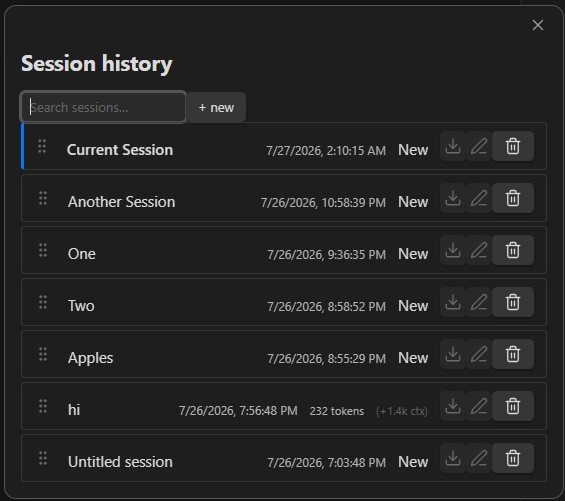
Open the session manager by clicking the session name in the panel toolbar, or via BojuBot: Show session history in the Command Palette.
Actions
| Action | How |
|---|---|
| Resume a session | Click any row |
| Save to vault | Hover a row → click the download icon → enter export path |
| Rename | Click the pencil icon → edit inline → Enter or click away |
| Delete | Click the trash icon → confirm |
| Reorder | Drag the ⠿ grip handle up or down |
| Filter | Type in the search box at the top |
Sessions with a locally-cached transcript show an estimated token count (e.g. "2.1k tokens"), with a "+context" figure alongside it — the estimated size of the context (vault tree, context file, orientation, etc.) a brand-new session would inject at start under your current settings. Sessions with no local transcript (New / Remote) show neither. Hover either number for details.
Active Session
The currently open session is marked with an accent-coloured left border and bold title.
Storage Location
Sessions are stored as JSON files in .obsidian/bojubot/sessions/ by default (gitignored). You can change this to a vault-relative or absolute path in Settings → BojuBot → Session storage path — for example, to track sessions in git alongside your notes.
WARNING
Changing the storage path only affects new sessions. Existing sessions stay where they are and won't appear in the manager until you switch back. Move the .json files manually if you want to bring them along.
Sort Order
Sessions are listed most-recent-first by default. Once you drag any row, that order is saved and persists across restarts. New sessions are always inserted at the top of the list — drag them into position afterwards.
TIP
Drag handles are hidden while the search filter is active — filtering shows a subset, so reordering would produce confusing results.
Token Cost Model
Understanding when tokens are spent helps you use BojuBot efficiently.
| Action | Token cost | Notes |
|---|---|---|
| Opening the panel | Free | No API call |
| Switching sessions in History | Free | Local disk read only |
| Browsing session history | Free | All local |
| First message of a new session | Full price | Context injection + prompt; cache created |
| Continuing a session (within ~1 hour) | Cheap | History from prompt cache (~10× cheaper) |
| Resuming after restart or 1+ hour gap | Full price | Cache expired; history re-charged as fresh tokens |
| Starting a new session | Free | No API call until you send |
TIP
Claude's prompt cache expires after ~1 hour. For sessions you haven't used in a while, starting a new session (paying only for context injection) may be cheaper than resuming a large accumulated one.